Loading ZDPS...
Blue Protocol : Star Resonance Companion Tool

Modern Damage Meter & Companion Platform

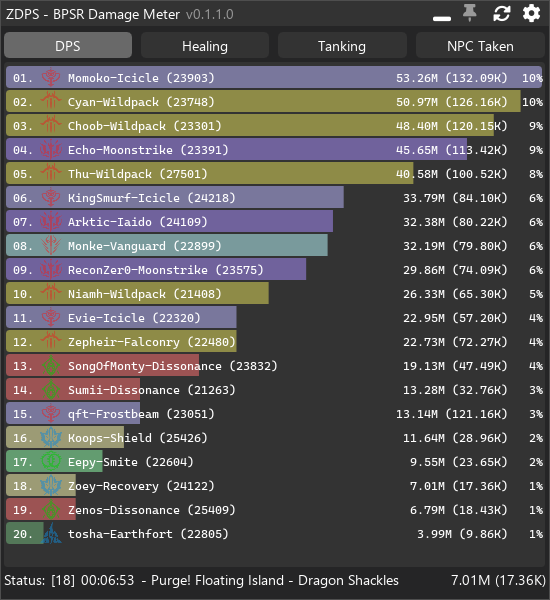
ZDPS is a modern Damage Meter and Companion Tool built for Blue Protocol: Star Resonance. It combines an ultra-fast real-time combat parser with an extensive toolkit including Encounter History, Module Optimizer, Raid Manager, Cooldown Tracking, Log Reporting, Event Tracker, Chat, Spawn Tracking, Integrations and many advanced quality-of-life systems. Designed with modern technologies, ZDPS delivers exceptional performance while remaining lightweight and memory efficient.
⚡ Ultra Fast Meter
🎯 Real-Time Combat

20+

Major Feature Systems

4

Default Combat Meters

100%

Local Encounter Database

AVX2

CPU Optimized Engine

Repository Overview

ZDPS goes far beyond a traditional DPS meter. Every encounter is automatically separated into combat phases, stored inside a local database, and can later be explored through an advanced history browser. The application supports multiple combat meters, detailed player inspection, raid coordination, event tracking, cooldown management, module optimization, Discord reporting, spawn tracking, benchmarking, chat integration, database management, custom overlays, window pinning, transparency controls, performance tuning, and many additional features. Rather than acting as only a parser, ZDPS becomes a complete companion platform for Blue Protocol: Star Resonance.

Real-time DPS Meter
Encounter History
Entity Inspector
Raid Manager
Module Optimizer
Cooldown Tracker
Discord Reports
Event Tracker
Chat Integration
Much More...
Getting Started

Before ZDPS can capture combat packets and begin displaying real-time combat information, a few required dependencies must be installed. The application is portable and does not require a traditional installer, but **Npcap** and **.NET 9 Desktop Runtime** must be available first.

1. Install Npcap

Required

ZDPS depends on Npcap for packet capture. Without it, combat packets cannot be read and the application will not function correctly.

  • Download latest Npcap release
  • Install version 1.85 or newer
  • Restart the game if already running
  • Verify packet capture works
IMPORTANT Most startup problems are caused by Npcap not being installed.

2. Install .NET 9

Desktop Runtime

ZDPS is built on .NET 9 and requires the Desktop Runtime. Only the Desktop Runtime should be installed. The SDK is not required.

  • x64 Desktop Runtime
  • .NET 9.x
  • Restart application afterwards
  • Automatic prompt if missing
Install the Desktop Runtime, not ASP.NET Runtime and not the SDK.
Installation Process

Download Dependencies

Download the required components before launching the application.

Install Npcap

Allow Windows network packet capture. Restart Blue Protocol afterwards.

Install .NET Desktop Runtime

Required runtime used by ZDPS.

Download ZDPS Release

Download the latest ZIP package. Do not download Source Code archives.

Extract Files

Extract to a normal folder. Avoid Program Files because Windows permissions may interfere.

Launch

Run BPSR-ZDPS.exe There is no installer. ZDPS is completely portable.

VPN Notice

VPN Users

If a VPN is used, connect the VPN before launching ZDPS. The application automatically selects the active network adapter during startup. If the VPN is enabled afterwards, restart ZDPS or manually choose the correct Network Capture Device inside the Settings menu. Changing adapters while running may stop packet detection until the adapter is reselected.

Download Overview

Latest Release

Download the latest release package. Extract it anywhere outside Program Files. Run the executable. Enjoy.

Download Release
Core Features

ZDPS is much more than a traditional damage meter. It combines combat analytics, raid utilities, historical encounter analysis, optimization tools, integrations, event tracking, database management, overlays, and collaboration features into one lightweight application.

DPS Meter

Real-time combat statistics with multiple meter modes and live encounter tracking.

Encounter History

Every encounter is automatically stored inside a local database.

Entity Inspector

Inspect every player or NPC in incredible detail.

Raid Manager

Cooldown tracking, raid warnings, countdowns and threat monitoring.

Module Optimizer

Find the best module combinations within seconds.

Integrations

Discord Reports, BPTimer, future community services and more.

Combat Meters

Four Default Meters

ZDPS includes four built-in meters that continuously update during combat. Each meter focuses on a different type of encounter analysis, allowing players to monitor combat performance from several perspectives without changing applications.

DPS Damage Done
Healing Healing Performance
Tanking Damage Taken
NPC Taken Enemy Statistics
Encounter History

Every Battle Saved

Every encounter is automatically stored inside a local compressed database. Historical encounters remain available even after restarting the application. Multiple encounters may be grouped into complete battles that include wipes, boss phases, and encounter transitions.

Automatic database storage
Historical replay
Boss phase separation
Battle grouping
Entity filtering
Open Entity Inspector directly
Automatic Encounter Detection

Combat Starts

ZDPS automatically begins tracking encounters.

Phase Detection

Boss transitions are split automatically.

Party Wipe

Wipes create new encounters without user interaction.

Database

Everything is saved for later inspection.

Entity Inspector

Every player and NPC can be inspected in detail. Simply click an entity from a meter or encounter history to open a complete breakdown of its combat statistics, skills, buffs, attributes, graphs and equipment.

Entity Inspector

Character Information

  • Name / UID
  • Level
  • Ability Score
  • Profession
  • Specialization
  • Current HP
  • Maximum HP

Combat Statistics

  • Total Damage
  • Total DPS
  • Total Healing
  • Shield Break
  • Critical Rate
  • Lucky Rate
  • Hit Count
Attack
Armor
Mastery
Strength
Endurance
Critical
Haste
Luck
Skill Analysis

Complete Skill Breakdown

Every skill used during combat is recorded with detailed analytics.

  • Total Damage
  • Total Healing
  • DPS / HPS
  • Number of Hits
  • Critical Rate
  • Average Damage
  • Average Healing
  • Percentage Contribution
  • Killing Blow Indicator

Interactive Graphs

Visualize encounter performance using multiple graph types.

  • Damage Over Time
  • DPS Timeline
  • Hits By Source
  • Skill Contribution
  • Historical Comparison
Gear Inspector

Equipment Viewer

When inspecting a player, the current equipment can also be viewed. This includes armor, weapons and equipped gear. Some values, such as certain reforging information, cannot be shown because they are not transmitted by the game.

Weapons Armor Accessories Equipment Slots Visual Inspection Player Loadout
Database Manager

Local Encounter Database

ZDPS stores encounters inside a highly compressed local database. Thousands of encounters can be stored while keeping storage usage very small. The Database Manager allows users to review or remove historical combat records at any time.

Compressed Storage
Manual Cleanup
Automatic Management
Persistent History
Raid Manager

ZDPS includes a complete collection of raid tools designed to coordinate groups, reduce mistakes, improve communication, and make organized content easier than ever.

Raid Manager

Coordinate every important raid mechanic using synchronized utilities.

Cooldown Priority

Track player cooldown rotations in real time.

Raid Warnings

Broadcast large warning messages to every ZDPS user.

Countdowns

Synchronize encounter pull timers.

Threat Meter

Monitor aggro generation during encounters.

Alerts

Custom sounds for important raid events.

Cooldown Priority Tracker

Skill Rotation Management

Assign players, select abilities, define cooldown durations and monitor every important support skill throughout the encounter. The tracker automatically manages cooldown timers and priority order.

1 Add Player
2 Choose Skill
3 Verify Cooldown
4 Track Rotation
Pinned Overlay Mode

Always On Top

Cooldown windows can be pinned, collapsed into compact mode, made transparent, and displayed directly over the game.

  • Top Most Window
  • Transparency
  • Collapse Mode
  • Minimal Overlay
Raid Warnings

Large Screen Alerts

Messages beginning with /rw are displayed as large orange notifications for every connected ZDPS user. Raid Warnings help ensure important mechanics are never missed.

/rw command Custom Sounds Blacklist Opacity Position Scaling
Raid Warning Settings
Raid Countdowns

Pull Timer

Start synchronized countdowns using the /countdown or /ct commands. Supported countdowns range from 3 to 30 seconds and may be cancelled at any time.

/ct 10
/countdown 30
/countdown stop
/countdown cancel
Countdown Settings
Threat Meter

Real-Time Aggro Monitoring

The Threat Meter continuously tracks enemy aggro generation. Current targets appear at the top, while remaining players are ranked relative to the second-highest threat, making it easier to identify potential aggro issues before they become dangerous.

Benchmark Mode

Optimize your combat rotation using repeatable benchmark sessions. Run identical tests, compare historical performance, and measure the impact of gear, modules, rotations and build changes with consistent timing.

Timed Sessions

Create repeatable combat windows for accurate performance testing.

Compare Results

Compare multiple benchmark runs to measure rotation improvements.

Improve Builds

Experiment with equipment, modules and skill priority to maximize damage.

Integrations

Community Integration Support

ZDPS supports optional integrations with community-driven services. No internet communication occurs automatically. Every integration must be enabled by the user inside the Settings menu.

Discord Webhook Reports
BPTimer Integration
Future Community Services
Manual Enable / Disable

Optional

Privacy first. Nothing is uploaded unless you explicitly enable it.

BPTimer Integration

Spawn Tracking

Track Field Bosses and Magical Creatures directly inside ZDPS. Monitor active regions, favorite monsters, spawn timers, and optionally contribute reports back to the community database.

Regions Field Bosses Magical Creatures Spawn Reports Realtime Updates Pinned Window
Module Optimizer

CPU Optimized

Find the best module combinations within seconds. ZDPS uses a highly optimized AVX2 CPU calculation engine instead of GPU acceleration. Even inventories approaching one thousand modules can be analyzed rapidly.

1000+

Supported Modules

AVX2

Optimized CPU Engine

Top 10

Best Results

Optimizer Workflow

Load Inventory

Teleport, change map or change line to update module inventory.

Choose Priorities

Select preferred stats and minimum breakpoint requirements.

Calculate

Start optimization. The CPU calculates every possible combination.

Review Results

Browse the highest scoring builds and compare alternatives.

Preset Sharing

Share Builds

Module Optimizer presets can be exported and imported using preset share codes. Exchange optimized configurations with friends, guild members, or the wider community.

Export Preset
Copy Share Code
Import Preset
Apply Configuration
Performance Notes

CPU Based

Uses processor power only. No CUDA or GPU acceleration required.

Priority Weighting

Arrange stat priorities to influence final scoring.

Reusable Presets

Save, share, import, and reuse optimization profiles.

Matchmaking Alerts

Never miss an activity queue again. ZDPS can monitor matchmaking status and immediately notify you when a queue has been accepted or requires attention.

Instant Alerts

Receive immediate notifications when matchmaking is ready.

Audio Notification

Play custom sounds so you never miss a queue while multitasking.

Desktop Overlay

Large fullscreen notifications appear above the game window.

Integrated Chat

Built-in Communication

ZDPS includes its own chat interface for supported integrations and community communication. The interface supports timestamps, system notifications, colored messages, scroll history, and automatic formatting.

Guild Raid Party System Notifications History
Event Tracker

Track Everything

The Event Tracker records important combat events and system activities during gameplay. Events can later be filtered, searched, and reviewed.

Boss Spawn
Encounter Start
Encounter End
Player Death
Resurrection
Cooldown Ready
Rare Drops
System Messages
Notification Center

Information

Displays application status, downloads, database activity, and informational messages.

Success

Operation completed successfully.

Warning

Configuration issues, missing dependencies, or important reminders.

Error

Displays unexpected failures with detailed diagnostic information.

Live Activity Feed
14:32 Encounter Started
14:35 Boss Phase Changed
14:37 Cooldown Ready
14:40 Raid Warning Received
14:42 Encounter Saved
Skill Timeline

Replay every encounter through a precise chronological timeline. Every skill, buff, debuff, dodge, death, resurrection and major combat event is displayed in the exact order it occurred.

Complete Combat Replay

Instead of reading numbers alone, the Skill Timeline visualizes the entire fight second by second. Each event is color coded, timestamped, and searchable.

Damage Events
Healing Events
Buff Timeline
Debuff Timeline
Deaths
Resurrections
Spawn Tracker

Field Boss Tracking

Monitor bosses currently alive, their spawn windows, and previous kill times.

Map Locations

Jump directly to tracked regions using integrated map support.

Respawn Timers

Estimated respawn countdowns are updated continuously.

Community Reports

Optional crowd-sourced reports improve spawn accuracy.

Overlay Windows

Desktop Overlay

Every major ZDPS window can operate as a lightweight desktop overlay. Windows may remain visible above the game, allowing important information to stay accessible without switching applications.

  • Always On Top
  • Borderless
  • Resizable
  • Mouse Click Through
  • Movable
  • Independent Windows
Window Pinning

Pin Anywhere

Keep your preferred windows exactly where you want them. Layouts are remembered automatically.

Independent Panels

Separate every tool into its own floating window.

Restore Layout

Saved layouts can be restored after restarting the application.

Transparency Controls

Adjust Visibility

Every overlay supports configurable transparency, opacity, background blur, and click-through behavior. Perfect for monitoring combat without obstructing gameplay.

Opacity
Background
Blur
Compact Mode

Minimal Interface

Reduce windows into extremely compact versions while preserving essential combat information. Perfect for players using smaller displays.

Compact UI Small Footprint Fast Access Low Distraction Resizable
Settings Center

Nearly every aspect of ZDPS can be customized. From appearance and overlays to network adapters, logging, integrations, notifications, performance, database behavior and advanced debugging.

Appearance

Theme, colors, transparency, fonts, scaling and layout.

Windows

Overlay mode, always-on-top, compact mode and pinning.

Network

Select capture adapters, VPN interfaces and packet options.

Database

Storage limits, cleanup rules and encounter history.

Notifications

Popup messages, sounds, raid warnings and countdowns.

Advanced

Developer options, diagnostics and experimental features.

Appearance & Themes

Modern Interface

Customize almost every visual aspect of the application. ZDPS remembers your preferences automatically and restores them the next time the application starts.

Dark
Blue
Glass
Compact
Performance

CPU Usage

Low

Optimized processing keeps CPU usage extremely low during long gameplay sessions.

Memory Usage

Stable

Efficient memory management minimizes allocations and reduces long-term fragmentation.

Database

Fast

Compressed encounter storage minimizes disk usage while keeping searches extremely fast.

Logging

Comprehensive Logging

ZDPS records diagnostic information that can assist with troubleshooting and bug reporting. Logging can be adjusted depending on the desired amount of detail.

Information
Warnings
Errors
Debug Optional
Verbose Optional
Diagnostics

Troubleshooting Tools

Built-in diagnostics help identify configuration problems, missing dependencies, packet capture issues, network adapter selection, database integrity and runtime exceptions.

  • Dependency Verification
  • Capture Device Test
  • Runtime Validation
  • Log Viewer
  • Error Reporting
  • Health Status
Advanced Configuration

Experimental Features

Preview upcoming functionality before general release.

Developer Mode

Enable additional diagnostic windows and internal information.

Maintenance

Database cleanup, cache reset, configuration reset and repair tools.

Project Roadmap

Combat Parser

Completed

Encounter History

Completed

Optimization

In Progress

Future Integrations

Planned

Frequently Asked Questions
ZDPS is portable, but required dependencies such as Npcap and the appropriate .NET Desktop Runtime must be installed.
The application is designed to remain lightweight and optimized for long gameplay sessions.
Yes. Encounter History automatically stores combat data inside the local database.
Repository

GitHub Repository

Browse the source code, documentation, release history, issues, and future development.

Live Combat Analytics

Monitor every encounter through an interactive dashboard designed to transform combat logs into meaningful insights. Animated graphs, performance indicators and timeline visualizations provide instant feedback during every battle.

Damage Timeline

LIVE

Session Statistics

Current DPS 153,280
Peak DPS 248,100
Critical Rate 42.6%
Lucky Rate 31.4%

Raid Health

Combat Heatmap

Visualize combat intensity over time. Brighter regions represent periods of higher activity.

Combat Achievements

Highest DPS

248,100 DPS

Longest Combo

152 Hits

Critical Chain

27 Consecutive Crits

Fastest Clear

04:38

Interactive World Intelligence

Explore the entire world through an animated strategic map. Discover bosses, dungeons, gathering locations, merchants, rare creatures, teleport points, events and dynamic world activities from one centralized interface.

World Coverage

Navigate every region using animated markers, zoomable sectors, layer filters, and live activity overlays. Map objects animate continuously and highlight important gameplay events.

Boss
Dungeon
City
World Event
Boss Encyclopedia

Ancient Dragon

World Boss

HP ???
Phase 3
Weakness Ice

Shadow Lord

Raid Boss

HP ???
Phase 2
Weakness Light

Arachnocrab

Dungeon Boss

HP ???
Phase 4
Weakness Fire
Loot Database
Item
Source
Drop Rate
Rarity
Legendary Weapon
Dragon
1.2%
Legendary
Epic Module
Raid
6.8%
Epic
Rare Crystal
Dungeon
18%
Rare
Neural Combat Intelligence

ZDPS is more than a combat parser. The long-term vision is an intelligent combat analysis engine capable of recognizing player behavior, predicting performance, discovering optimization opportunities, and explaining encounters through advanced statistical analysis.

Behavior Analysis

Analyze rotations, downtime, movement, cooldown usage, resource waste, buff uptime, and encounter efficiency.

Recommendation Engine

Generate intelligent recommendations based on encounter history and historical performance.

Optimization Suggestions

Highlight opportunities for improving damage, healing, survivability, and resource efficiency.

Combat Relationship Network
Player Skills Gear DPS
Benchmark Laboratory

Controlled Testing

Benchmark sessions allow repeatable combat testing under identical conditions. Track every variable between equipment, modules, skills, rotations and buffs.

Equipment Tests
Rotation Tests
Module Tests
Party Buff Tests
Holographic Statistics
87%

Skill Efficiency

96%

Buff Uptime

91%

Rotation Quality

Future Vision

Building The Next Generation Combat Platform

The future roadmap extends beyond damage parsing. Future concepts include intelligent encounter replay, strategy simulation, machine-assisted optimization, automatic raid summaries, predictive combat models, and interactive visualization systems. Every release aims to transform combat logs into meaningful knowledge rather than simple statistics.

Glass Command Center

A futuristic dashboard providing instant access to every major ZDPS component. Designed for high-speed navigation using modern glassmorphism effects, animated widgets and responsive layouts.

System Status

● ONLINE
Running
Healthy
Connected
183 MB
2.3%
Npcap

Latest Release

Download the newest stable version with one click.

Documentation

Browse installation guides, examples, API references and tutorials.

Issue Tracker

Report bugs, request features or follow ongoing development.

Download Hub

Stable

Recommended for everyone.

Preview

Latest experimental features.

Nightly

Automatically generated development builds.

Plugin Marketplace

Extend ZDPS with optional community modules. Future plugins can introduce overlays, boss helpers, custom statistics, new visualizations, automation tools and quality-of-life improvements.

Statistics Pack

Advanced charts, heatmaps, and comparison reports.

World Map

Enhanced boss tracking, teleports, and routes.

Developer Tools

Internal packet viewer, profilers and debugging utilities.

Extension SDK

Developer Platform

A future SDK may allow third-party developers to create custom extensions, visual dashboards, analysis engines, data exporters, automation workflows and additional integrations.

Core API
Plugin
Marketplace

Plugin.Initialize();

Parser.Subscribe();

Encounter.OnFinished += Export;

Overlay.Create();

Statistics.Register();

Repository Dashboard

Stars

0

Forks

0

Commits

0

Releases

0
Interactive Terminal
> Initializing Parser...
> Loading Modules...
> Opening Database...
> Capturing Packets...
> Ready.
NEXT GENERATION COMBAT ANALYTICS

Experience Combat Data Like Never Before

Beautiful visualization. Real-time combat parsing. Modern desktop experience. Animated statistics. Professional overlays. Advanced analytics. Everything combined into one powerful companion application.

150+ Features
60 FPS Animations
100% Responsive
Customization
DPS 248K
UPTIME 98%
FPS 60
PING 22ms
Visual Rendering Engine

A modern rendering system utilizing glassmorphism, gradients, animated SVG graphics, 3D transforms, motion effects, particle systems, responsive layouts and GPU accelerated animations.

Glass UI

Dynamic blur and transparency.

3D Motion

Perspective and parallax.

Particles

GPU-inspired effects.

Smooth

60 FPS animations.

Integrated AI Assistant

An intelligent assistant designed to help analyze combat logs, search encounters, explain mechanics, compare builds, locate bosses, discover statistics, and navigate every feature inside the application.

ZDPS AI

Online
Hello Commander.
How can I help you today?
Compare my last raid with yesterday.
Opening Encounter Comparison...
Statistics
Boss Guide
Loot Search
World Map
Optimization
Documentation
Universal Command Palette

Press Ctrl + K anywhere to instantly search every tool, window, boss, encounter, module, setting, or documentation page.

⌘ Search Everything...
Damage Statistics Dashboard
Settings System
Shadow Lord Boss
Module Optimizer Feature
Encounter Timeline Combat
📊 Combat Statistics
🐉 Boss Encyclopedia
⚔ Encounter History
📦 Module Optimizer
🗺 World Map
⚙ Settings
📁 Downloads
Live Development Center

Follow the evolution of ZDPS through a dynamic release center. Track milestones, feature development, commits, preview builds, nightly updates, and community activity in real time.

Development Timeline

v1.0

Initial Parser Engine

v1.5

Encounter Database

v2.0

Overlay Framework

Future

Plugin Marketplace

Future

AI Assistant

Live Release Feed

Now Parser initialized successfully.
2m Encounter database synchronized.
5m Overlay module loaded.
11m Performance benchmark completed.
Notification Center

Database Ready

Everything is synchronized.

Update Available

Preview build detected.

Experimental Mode

Development features enabled.

Home
Statistics
Bosses
Map
Modules
Settings
Downloads
Community Activity

Latest Build

Preview Build

Open Issues

24

Merged PRs

128

Downloads

0
The Future of Combat Analysis

ZDPS is designed with scalability in mind. Every system is modular, allowing future expansions including AI-powered combat coaching, cloud synchronization, cross-platform analytics, community plugins, real-time collaboration, encounter replay, and next-generation visualization.

Cloud Sync

Synchronize encounters, settings, layouts and preferences.

Machine Learning

Automatically identify inefficient rotations and recommend improvements.

Raid Collaboration

Compare encounters between multiple players in real time.

Next Generation UI

Immersive visualizations, 3D dashboards, advanced interaction and modern rendering.

Platform Architecture
```